Here's How to Try Out T-Mobile Home Internet (For Free)
 Sarah Tew/CNET
If you're fed up with your high cable bill, your slow DSL speeds or any other of the lackluster internet options in your area, maybe you've considered skipping the wires and getting your home online with a fixed wireless cellular connection. Connections like that are nothing new, but this year, Verizon and T-Mobile are each promising better availability and faster 5G speeds, and they're each stepping up their efforts to win customers over with high-profile ad blitzes and tempting promotions for switching over.
Now, in the case of T-Mobile, you can try the company's home internet service out for free for up to 15 days.
There are plenty of reasons why you would want to do that. Like with Verizon, home internet service from T-Mobile costs a flat $50 per month with no data caps and no additional equipment fees, so the value is pretty compelling from the get-go. If you already have a Magenta Max phone plan with T-Mobile, you can score a $20 home internet discount, bringing your monthly broadband bill down to just $30. The company also promises to price-lock your broadband bill, which means that it won't raise your internet rates for as long as you stay a customer.
T-Mobile's top speeds aren't as fast as Verizon's, but the company now says that downloads range from 33-182Mbps, which is slightly up from the top speed of 115Mbps the company listed earlier this year, so things seem to be moving in the right direction. All of that makes T-Mobile's home internet plan a decent alternative at addresses where faster fiber connections aren't an option.
The downside to cellular internet is that your speeds will depend upon the strength of the signal at your address. Some customers might also experience slowdowns during periods of interference or peak congestion. That's why a 15-day free trial makes a lot of sense -- you won't need to cancel service with whatever provider you're currently getting your internet connection from until you've got a good sense of how T-Mobile actually compares at your specific address. And, if you decide T-Mobile is better for your broadband needs, the carrier is also offering to cover up to $500 of any expenses stemming from early cancellation fees and the like from your old provider.
Testing out T-Mobile's home internet service
07:29Large play-pause toggle
00:0000:00
If you're ready to take T-Mobile up on all of that, here's how you can get started.
 Enlarge Image
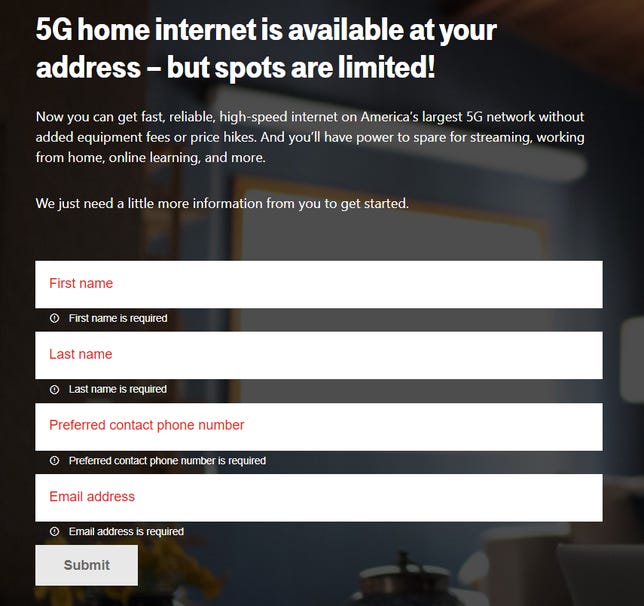
You'll need to check to see if T-Mobile's home internet service is even an option at your address.T-Mobile/Screenshot by Ry Crist/CNET
Step 1: Check availability
T-Mobile says that its home internet service is now available to more than 40 million homes, but that doesn't mean it's available everywhere. Before signing up, you'll need to confirm that your home falls within T-Mobile's cellular coverage map.
To do so, just head to this link to plug your address and phone number into T-Mobile's website. If service is available at your address, you'll be asked to provide your name, your email and your preferred contact number. Once you submit those, a T-Mobile representative should reach out to you to walk you through the sign-up process. You'll need to create an account and provide your billing information, but if you decide not to continue service before your 15-day trial is up, you'll get your initial payment back.
Step 2: Start your service
With no special wiring necessary, setting up a cellular internet plan is pretty simple. In T-Mobile's case, the company will send you a gateway device that acts as both the cellular modem and your home's Wi-Fi router -- you find a good spot for it on a shelf or in a windowsill, you plug it in and follow T-Mobile's instructions on how to set your network up, and that's it.
The finicky part is that you'll probably want to try moving the gateway to a couple of different spots to see which one gets the best signal. You'll find some helpful placement tips on the T-Mobile support website, along with step-by-step instructions for getting everything up and running. It's probably also worth running a few quick speed tests to make sure that you're getting the best speeds possible.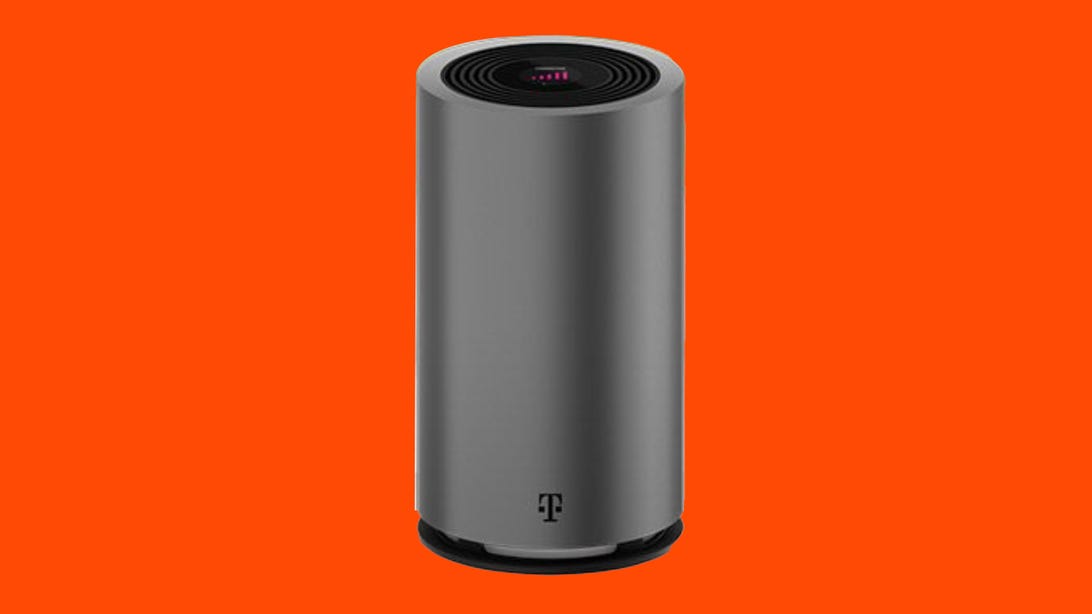
T-Mobile's 5G Gateway acts as both a cellular receiver and as your home's Wi-Fi router.T-Mobile
Step 3: Try it out
Once everything is up and running, you'll have 15 days from when you started service to try the connection out and make sure it's a good fit for your home. So, spend two weeks using the internet as you normally would. Stream some video, browse your favorite sites, do whatever you usually do -- and watch to see if things stay more or less consistent from one day to the next.
Minor fluctuations in speeds are to be expected with home internet -- especially a fixed wireless cellular connection. Still, if speeds ever screech to a halt, or if the connection feels noticeably laggy during peak evening hours, you'll want to take that into consideration and ask yourself if you'd be willing to put up with it on a regular basis.
Step 4: Use it or lose it
Hopefully, by the end of two weeks, you'll have a good sense of whether or not T-Mobile Home Internet is a good option at your address. If the signal seems strong and the service seems capable of meeting your need for speed, it's probably worth giving it a shot. $50 per month is more than reasonable for home internet that gets the job done, and T-Mobile's terms are about as appealing as broadband gets. Again, there are no data caps, no price increases and no equipment fees, and you won't be locked into a contract, either, so you really don't have much to lose. And, if your current provider charges an early termination fee, T-Mobile will reimburse you for that up to $500.
If you have T-Mobile's Magenta Max mobile plan, signing up for home internet service where available is close to a no-brainer for that discounted rate of $30 per month. Phone-and-internet bundlers also get half off a year's subscription to YouTube TV, which is another nice value ($390 worth, in fact).
On the other hand, if the signal seems weak or unreliable at your address, you'll probably be better off with something else. You can check for alternatives here on CNET, but first, you'll want to be sure to let T-Mobile know that you'd like to stop service by calling the company's sales support at 844-839-5057. You'll get your initial payment back as a one-time bill credit if you're within that 15-day trial window -- from there, all you'll need to do is return the gateway in a timely fashion.
Gaming
Apex Legends Season 13: Newcastle, Storm Point Updates and Ranked Changes
Season 13 of Apex Legends is here with a new defensive legend. Plus, a dead beast washes up on Storm Point and majorly overhauls the ranked system.

Adam Benjamin
May 10, 2022 3:06 p.m. PT
4 min read

Newcastle is the latest Legend joining the fray.
Respawn Entertainment
Apex Legends, the battle royale shooter set in the Titanfall universe, has ushered in season 13. Titled Saviors, the season introduces a new hero and substantial changes to the ranked system.
The launch of Saviors follows Apex's third anniversary celebration, which kicked off in February. Alongside a new battle pass, players get a heap of fresh content as well as myriad balance tweaks to weapons and other items.
Loba mains be warned: Some players are also reporting that Loba's tactical ability is broken in season 13, sometimes preventing her from teleporting when she tosses her bracelet. The ability worked somewhat consistently when I tested it in Arenas, but not 100% of the time.
Before you dive in, here's what you need to know about the new Apex Legends season.
What time does Apex season 13 start?
Apex Legends season 13 began at 10 a.m. PT (1 p.m. ET) on Tuesday, May 10, on all platforms. Seasons typically last three months, so the season should run through early or mid-August.
Apex Legends' new hero: Newcastle
Season 13 introduces the Legend Newcastle, a defensive specialist and brother to Bangalore. If you've ever wished you could just build a castle in the middle of the battlefield, Newcastle is your hero. He joins other defensive Legends like Gibraltar and Wattson by providing cover and protection for teammates.
Here's a breakdown of Newcastle's abilities:Tactical: Mobile Shield. Throw a movable shield drone that blocks gunfire and grenades.
Passive: Retrieve the Wounded. You can drag allies as you revive them and protect them with a revive shield.
Ultimate: Castle Wall. Jump through the air and deploy a fortified stronghold to give your team cover wherever you need it.
Apex Legends ranked changes
Three years after Apex Legends launched, developers at Respawn decided the ranked system needed an overhaul. Apex season 13 majorly reworks the ranked experience, focusing more on team play and better measuring and rewarding skill.
Many of these changes make it easier to earn ranked points (RP) if your team performs well and you contribute to your team's kill count. Other changes are aimed at ensuring rankings are an accurate measure of player skill.
Here's a quick summary of how ranked games are changing in Saviors.New tier: Rookie. Rookie tier has no entry cost and awards no RP. Players can't be demoted to this tier.
Players can now be demoted to a lower rank if they drop below the rank threshold. But they'll be protected for three games after a promotion, meaning you won't immediately derank if you lose your first game or two after promotion.
Entry costs have been modified across all ranks. Costs for Master rank increase the higher your rank.
RP rewards have been adjusted based on final placement in a match. Kills are now worth less if you don't place 10th or better. Placement RP rewards are also lowered at higher placements, meaning you'll earn less RP if you don't contribute to kills.
The cap on earning RP for kills has been removed. Instead, each kill is worth progressively less RP.
Killing players from lower skill tiers rewards more RP (i.e. the RP penalty for killing players from lower tiers has been reduced).
Assists are now measured on a 15-second timer, up from 10 seconds. If an enemy is revived, the assist timer refreshes.
RP thresholds for tiers and divisions have been adjusted to account for the increased ways to earn RP.
For full details, check out Apex Legends' blog post on the ranked update.
Map updates: Storm Point
Season 13 changes up the Storm Point map with a few new additions. The most noticeable will be the washed-up carcass of the Downed Beast, which we saw in the Saviors cinematic last month. You'll be able to fight around, on top of and even inside the creature, where you'll find a high-tier loot zone.
Storm Point is also getting IMC Armories: new bunkers that add a PvE element to the game. Take out waves of hostile Spectres inside the armories -- if you survive for 60 seconds, you'll earn loot and the ability to launch out of the armory. Killing more Spectres earns you better loot.
For full details, check out Apex Legends' blog post on the Storm Point updates.
Season 13 battle pass
With every new season comes a new battle pass, and Saviors is no different. The Apex season 13 battle pass is themed around knights and dragons, which lines up pretty nicely with the vibe and look of Newcastle. You'll get the usual assortment of Apex coins, crafting metals and Apex packs in addition to epic skins for Newcastle, Mad Maggie and Pathfinder.
Apex Legends patch notes
You can check out the Apex season 13 patch notes for the full details on Survivors, but here are a few final changes worth calling out:Being out of bounds now disables the following features: Legend abilities (including active passives), healing items (unless you were healing before you went out of bounds) and any weapons, ordnances and survival items.
Fortified no longer protects Legends from headshot damage. Instead, blue and purple helmets now reduce headshot damage by higher percentages (50% and 65%).
Cell and syringe respawn rates have been reduced 18%.
For more gaming coverage, check out our thoughts on the Overwatch 2 PVP beta and our guide to playing Elden Ring.
Services & Software
Google Maps Has a New Tool Coming Soon. Here's How It Works
Google's latest addition to Maps will begin rolling out this year. Here's what it does.

Katie Teague
May 16, 2022 12:15 p.m. PT
2 min read

Google Maps is adding a new tool soon.
Sarah Tew/CNET
Google is rolling out a new feature for its Maps app, it announced at its Google I/O event on May 11. Called Immersive View, it takes Street View to a new level. It works by using billions of photos to model buildings and trees in 3D using machine learning. Once it's available, you'll be able to experience what a restaurant, neighborhood, landmark or popular venue is like as if you're already there.
The tech giant also showed off the next major update to Android, new security protections and a new Look and Talk feature that lets you interact with Google Assistant without saying a wake word.
We'll explain what Immersive View is and when you can start using it. We'll also tell you about some updates to two Google Maps features.
Google Maps Immersive View Reveals Building Interiors
01:25Large play-pause toggle
00:0000:00
How Immersive View will work
If you're planning a trip and are curious about a city or neighborhood you've never visited, Immersive View can help you get your bearings about the location. When you search a city -- for instance, London -- you'll be able to see neighborhoods, restaurants, landmarks and other areas as if you're already there.
If you're visiting one of the cities with Immersive View, you can also see what it looks like during a certain time of day and during various weather conditions. You can also see where the busy spots are if you're looking for a popular area or places to avoid.
And you can take a glimpse inside restaurants as if you're walking through the building to check out the vibe before going. Live busyness and nearby traffic information will also be available.
Immersive View exploring the Westminster Abbey.Google
When will Immersive View be available in Google Maps?
Google says Immersive view will start rolling out in Los Angeles, London, New York, San Francisco and Tokyo later this year, but didn't specify when. At launch it'll be available only in those cities, but will come to more cities afterward.
Is this also available for iPhone users?
Often, when a new Google Maps feature is released, iPhone users are the last to see it. However, Google says Immersive view will work on almost any phone and device, and that includes your beloved iPhone.
Other updates to Google Maps features
Google has updated two of its Maps features: eco-friendly routing and Live View.
Eco-friendly routing lets you see and choose the most fuel-efficient route when getting driving directions to help you save money on gas.
Live View uses AR to display arrows and directions right on your screen as you walk around town. Google has now made this technology available to developers for free with the new ARCore Geospatial API.
For more, check out these six Google Maps tricks. Also, here are some Google Travel tips you should start using today.
Sarah Tew/CNETIf you're fed up with your high cable bill, your slow DSL speeds or any other of the lackluster internet options in your area, maybe you've considered skipping the wires and getting your home online with a fixed wireless cellular connection. Connections like that are nothing new, but this year, Verizon and T-Mobile are each promising better availability and faster 5G speeds, and they're each stepping up their efforts to win customers over with high-profile ad blitzes and tempting promotions for switching over.
Now, in the case of T-Mobile, you can try the company's home internet service out for free for up to 15 days.
There are plenty of reasons why you would want to do that. Like with Verizon, home internet service from T-Mobile costs a flat $50 per month with no data caps and no additional equipment fees, so the value is pretty compelling from the get-go. If you already have a Magenta Max phone plan with T-Mobile, you can score a $20 home internet discount, bringing your monthly broadband bill down to just $30. The company also promises to price-lock your broadband bill, which means that it won't raise your internet rates for as long as you stay a customer.
T-Mobile's top speeds aren't as fast as Verizon's, but the company now says that downloads range from 33-182Mbps, which is slightly up from the top speed of 115Mbps the company listed earlier this year, so things seem to be moving in the right direction. All of that makes T-Mobile's home internet plan a decent alternative at addresses where faster fiber connections aren't an option.
The downside to cellular internet is that your speeds will depend upon the strength of the signal at your address. Some customers might also experience slowdowns during periods of interference or peak congestion. That's why a 15-day free trial makes a lot of sense -- you won't need to cancel service with whatever provider you're currently getting your internet connection from until you've got a good sense of how T-Mobile actually compares at your specific address. And, if you decide T-Mobile is better for your broadband needs, the carrier is also offering to cover up to $500 of any expenses stemming from early cancellation fees and the like from your old provider.
Testing out T-Mobile's home internet service
07:29Large play-pause toggle
00:0000:00
If you're ready to take T-Mobile up on all of that, here's how you can get started.
Enlarge ImageYou'll need to check to see if T-Mobile's home internet service is even an option at your address.T-Mobile/Screenshot by Ry Crist/CNET
Step 1: Check availability
T-Mobile says that its home internet service is now available to more than 40 million homes, but that doesn't mean it's available everywhere. Before signing up, you'll need to confirm that your home falls within T-Mobile's cellular coverage map.
To do so, just head to this link to plug your address and phone number into T-Mobile's website. If service is available at your address, you'll be asked to provide your name, your email and your preferred contact number. Once you submit those, a T-Mobile representative should reach out to you to walk you through the sign-up process. You'll need to create an account and provide your billing information, but if you decide not to continue service before your 15-day trial is up, you'll get your initial payment back.
Step 2: Start your service
With no special wiring necessary, setting up a cellular internet plan is pretty simple. In T-Mobile's case, the company will send you a gateway device that acts as both the cellular modem and your home's Wi-Fi router -- you find a good spot for it on a shelf or in a windowsill, you plug it in and follow T-Mobile's instructions on how to set your network up, and that's it.
The finicky part is that you'll probably want to try moving the gateway to a couple of different spots to see which one gets the best signal. You'll find some helpful placement tips on the T-Mobile support website, along with step-by-step instructions for getting everything up and running. It's probably also worth running a few quick speed tests to make sure that you're getting the best speeds possible.
T-Mobile's 5G Gateway acts as both a cellular receiver and as your home's Wi-Fi router.T-Mobile
Step 3: Try it out
Once everything is up and running, you'll have 15 days from when you started service to try the connection out and make sure it's a good fit for your home. So, spend two weeks using the internet as you normally would. Stream some video, browse your favorite sites, do whatever you usually do -- and watch to see if things stay more or less consistent from one day to the next.
Minor fluctuations in speeds are to be expected with home internet -- especially a fixed wireless cellular connection. Still, if speeds ever screech to a halt, or if the connection feels noticeably laggy during peak evening hours, you'll want to take that into consideration and ask yourself if you'd be willing to put up with it on a regular basis.
Step 4: Use it or lose it
Hopefully, by the end of two weeks, you'll have a good sense of whether or not T-Mobile Home Internet is a good option at your address. If the signal seems strong and the service seems capable of meeting your need for speed, it's probably worth giving it a shot. $50 per month is more than reasonable for home internet that gets the job done, and T-Mobile's terms are about as appealing as broadband gets. Again, there are no data caps, no price increases and no equipment fees, and you won't be locked into a contract, either, so you really don't have much to lose. And, if your current provider charges an early termination fee, T-Mobile will reimburse you for that up to $500.
If you have T-Mobile's Magenta Max mobile plan, signing up for home internet service where available is close to a no-brainer for that discounted rate of $30 per month. Phone-and-internet bundlers also get half off a year's subscription to YouTube TV, which is another nice value ($390 worth, in fact).
On the other hand, if the signal seems weak or unreliable at your address, you'll probably be better off with something else. You can check for alternatives here on CNET, but first, you'll want to be sure to let T-Mobile know that you'd like to stop service by calling the company's sales support at 844-839-5057. You'll get your initial payment back as a one-time bill credit if you're within that 15-day trial window -- from there, all you'll need to do is return the gateway in a timely fashion.
Gaming
Apex Legends Season 13: Newcastle, Storm Point Updates and Ranked Changes
Season 13 of Apex Legends is here with a new defensive legend. Plus, a dead beast washes up on Storm Point and majorly overhauls the ranked system.
Adam Benjamin
May 10, 2022 3:06 p.m. PT
4 min read
Newcastle is the latest Legend joining the fray.
Respawn Entertainment
Apex Legends, the battle royale shooter set in the Titanfall universe, has ushered in season 13. Titled Saviors, the season introduces a new hero and substantial changes to the ranked system.
The launch of Saviors follows Apex's third anniversary celebration, which kicked off in February. Alongside a new battle pass, players get a heap of fresh content as well as myriad balance tweaks to weapons and other items.
Loba mains be warned: Some players are also reporting that Loba's tactical ability is broken in season 13, sometimes preventing her from teleporting when she tosses her bracelet. The ability worked somewhat consistently when I tested it in Arenas, but not 100% of the time.
Before you dive in, here's what you need to know about the new Apex Legends season.
What time does Apex season 13 start?
Apex Legends season 13 began at 10 a.m. PT (1 p.m. ET) on Tuesday, May 10, on all platforms. Seasons typically last three months, so the season should run through early or mid-August.
Apex Legends' new hero: Newcastle
Season 13 introduces the Legend Newcastle, a defensive specialist and brother to Bangalore. If you've ever wished you could just build a castle in the middle of the battlefield, Newcastle is your hero. He joins other defensive Legends like Gibraltar and Wattson by providing cover and protection for teammates.
Here's a breakdown of Newcastle's abilities:Tactical: Mobile Shield. Throw a movable shield drone that blocks gunfire and grenades.
Passive: Retrieve the Wounded. You can drag allies as you revive them and protect them with a revive shield.
Ultimate: Castle Wall. Jump through the air and deploy a fortified stronghold to give your team cover wherever you need it.
Apex Legends ranked changes
Three years after Apex Legends launched, developers at Respawn decided the ranked system needed an overhaul. Apex season 13 majorly reworks the ranked experience, focusing more on team play and better measuring and rewarding skill.
Many of these changes make it easier to earn ranked points (RP) if your team performs well and you contribute to your team's kill count. Other changes are aimed at ensuring rankings are an accurate measure of player skill.
Here's a quick summary of how ranked games are changing in Saviors.New tier: Rookie. Rookie tier has no entry cost and awards no RP. Players can't be demoted to this tier.
Players can now be demoted to a lower rank if they drop below the rank threshold. But they'll be protected for three games after a promotion, meaning you won't immediately derank if you lose your first game or two after promotion.
Entry costs have been modified across all ranks. Costs for Master rank increase the higher your rank.
RP rewards have been adjusted based on final placement in a match. Kills are now worth less if you don't place 10th or better. Placement RP rewards are also lowered at higher placements, meaning you'll earn less RP if you don't contribute to kills.
The cap on earning RP for kills has been removed. Instead, each kill is worth progressively less RP.
Killing players from lower skill tiers rewards more RP (i.e. the RP penalty for killing players from lower tiers has been reduced).
Assists are now measured on a 15-second timer, up from 10 seconds. If an enemy is revived, the assist timer refreshes.
RP thresholds for tiers and divisions have been adjusted to account for the increased ways to earn RP.
For full details, check out Apex Legends' blog post on the ranked update.
Map updates: Storm Point
Season 13 changes up the Storm Point map with a few new additions. The most noticeable will be the washed-up carcass of the Downed Beast, which we saw in the Saviors cinematic last month. You'll be able to fight around, on top of and even inside the creature, where you'll find a high-tier loot zone.
Storm Point is also getting IMC Armories: new bunkers that add a PvE element to the game. Take out waves of hostile Spectres inside the armories -- if you survive for 60 seconds, you'll earn loot and the ability to launch out of the armory. Killing more Spectres earns you better loot.
For full details, check out Apex Legends' blog post on the Storm Point updates.
Season 13 battle pass
With every new season comes a new battle pass, and Saviors is no different. The Apex season 13 battle pass is themed around knights and dragons, which lines up pretty nicely with the vibe and look of Newcastle. You'll get the usual assortment of Apex coins, crafting metals and Apex packs in addition to epic skins for Newcastle, Mad Maggie and Pathfinder.
Apex Legends patch notes
You can check out the Apex season 13 patch notes for the full details on Survivors, but here are a few final changes worth calling out:Being out of bounds now disables the following features: Legend abilities (including active passives), healing items (unless you were healing before you went out of bounds) and any weapons, ordnances and survival items.
Fortified no longer protects Legends from headshot damage. Instead, blue and purple helmets now reduce headshot damage by higher percentages (50% and 65%).
Cell and syringe respawn rates have been reduced 18%.
For more gaming coverage, check out our thoughts on the Overwatch 2 PVP beta and our guide to playing Elden Ring.
Services & Software
Google Maps Has a New Tool Coming Soon. Here's How It Works
Google's latest addition to Maps will begin rolling out this year. Here's what it does.
Katie Teague
May 16, 2022 12:15 p.m. PT
2 min read
Google Maps is adding a new tool soon.
Sarah Tew/CNET
Google is rolling out a new feature for its Maps app, it announced at its Google I/O event on May 11. Called Immersive View, it takes Street View to a new level. It works by using billions of photos to model buildings and trees in 3D using machine learning. Once it's available, you'll be able to experience what a restaurant, neighborhood, landmark or popular venue is like as if you're already there.
The tech giant also showed off the next major update to Android, new security protections and a new Look and Talk feature that lets you interact with Google Assistant without saying a wake word.
We'll explain what Immersive View is and when you can start using it. We'll also tell you about some updates to two Google Maps features.
Google Maps Immersive View Reveals Building Interiors
01:25Large play-pause toggle
00:0000:00
How Immersive View will work
If you're planning a trip and are curious about a city or neighborhood you've never visited, Immersive View can help you get your bearings about the location. When you search a city -- for instance, London -- you'll be able to see neighborhoods, restaurants, landmarks and other areas as if you're already there.
If you're visiting one of the cities with Immersive View, you can also see what it looks like during a certain time of day and during various weather conditions. You can also see where the busy spots are if you're looking for a popular area or places to avoid.
And you can take a glimpse inside restaurants as if you're walking through the building to check out the vibe before going. Live busyness and nearby traffic information will also be available.
Immersive View exploring the Westminster Abbey.Google
When will Immersive View be available in Google Maps?
Google says Immersive view will start rolling out in Los Angeles, London, New York, San Francisco and Tokyo later this year, but didn't specify when. At launch it'll be available only in those cities, but will come to more cities afterward.
Is this also available for iPhone users?
Often, when a new Google Maps feature is released, iPhone users are the last to see it. However, Google says Immersive view will work on almost any phone and device, and that includes your beloved iPhone.
Other updates to Google Maps features
Google has updated two of its Maps features: eco-friendly routing and Live View.
Eco-friendly routing lets you see and choose the most fuel-efficient route when getting driving directions to help you save money on gas.
Live View uses AR to display arrows and directions right on your screen as you walk around town. Google has now made this technology available to developers for free with the new ARCore Geospatial API.
For more, check out these six Google Maps tricks. Also, here are some Google Travel tips you should start using today.
Comments
Post a Comment